


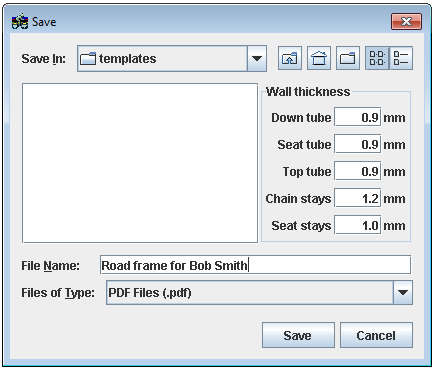
BikeCAD Pro can export templates for coping the mitres at the ends of the down tube, seat tube, top tube, chain stays and seat stays. Just choose: File >> Export miter template (PDF) and select either 8.5" x 11", 11" x 17", A4 or A3 sheet size. When the Save dialog box appears, enter the appropriate wall thickness for each tube in the column on the right hand side.
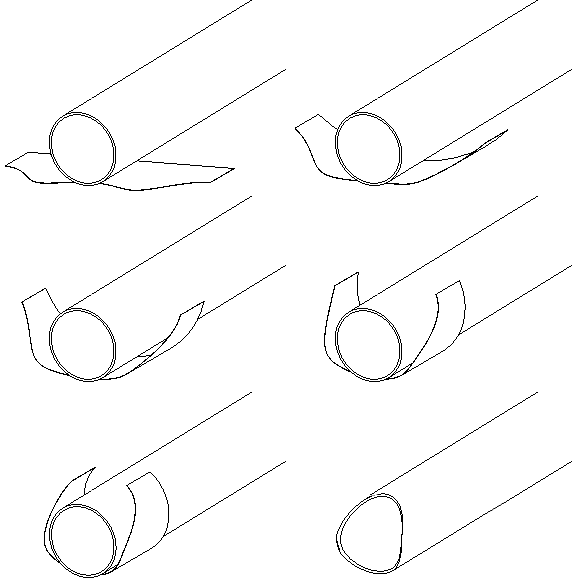
BikeCAD Pro will export a PDF file with templates that can be wrapped around the ends of the tubes as shown above. By default, the file will be called Your File Name_MT.pdf. Click here for a sample.
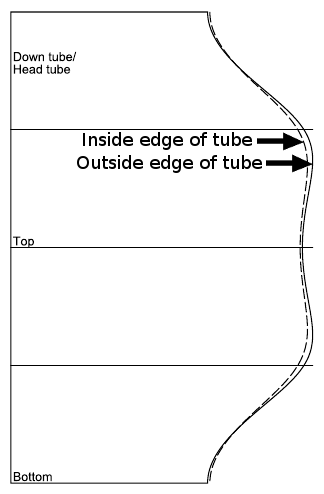
Each template is identified by the label at the top. The template on the right for example is for the end of the down tube which joins with the head tube.
The horizontal lines identify which part of the template aligns with the top of the tube and which part of the templates aligns with the bottom of the tube. Be careful. The width of the template must match perfectly with the circumference of the tube. If the template does not match, check that the PDF file was not scaled in some way when sent to the printer. Click here for a sample print dialog box.
Along the right hand side, there are two curves which define the profile of the mitre. The solid curve relates to the outer diameter of the tube and the dashed curve relates to the inner diameter of the tube. As a rule, you will want to follow the curve which removes the most material. However, if you are able to taper your cut across the wall thickness, then you may be able to follow both. This would either require great skill or simply a different approach to cutting the miter. A different approach would involve the use of a hole cut saw either mounted to a mill, a lathe or a tube notching jig. When milling the miters with a hole cut saw, use BikeCAD Pro's handy display of miter angles and the miter to miter distances on the tubes as a guide.
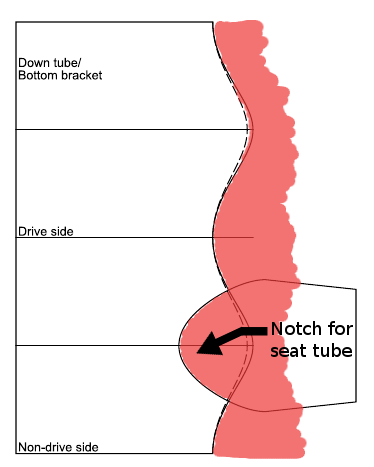
Note that the template for the rear end of the down tube will usually include an extra profile describing the intersection of the seat tube. The image on the left shows how this profile should be interpreted. Material to be removed is shown in pink. The drive side and non-drive sides of the tube are marked out by the horizontal lines.
BikeCAD can model seat tubes, down tubes and chain stays with centerlines that are offset from the center of the BB. This option is available by choosing Offset in the Tubing section.
Because paper thickness is not accounted for when generating the templates, you could consider increasing the diameter of all tubes by two times the paper thickness. If the circumference of a 28.6mm tube is 89.85mm, then assuming a paper thickness of 0.09652mm the circumference of the outer face of the paper template wrapping that tube would be 90.46mm. That's a difference in circumference of 0.6mm!